Keep the links. Make room at the broker.
Your network can stay at 10G or 25G. Your monitoring tools can too. With the right TAPs and breakout optics, a 40G/100G packet broker can connect them using fewer physical ports.
The key is to treat each high-speed port as a set of independent receive lanes. TAPstack copies the traffic from the fiber; PacketMaestro receives those copies and sends the relevant packets to your tools.
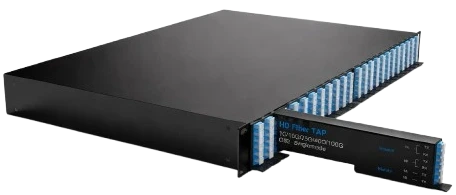
A port has lanes. A link has directions.
Every duplex link carries traffic in both directions. A passive TAP exposes each direction as a separate simplex monitor feed. That means two receive lanes per monitored link.
A compatible QSFP port in breakout mode provides four independent lanes: 10G lanes on a 40G port, or 25G lanes on a 100G port. The harness connects each TAP feed to its own receive lane.
Start with the fiber, then choose the optics.
The TAP, harness and broker optic need to agree on the optical path. These are the multimode and singlemode combinations for the receive side of the packet broker.
MultimodeMMF / OM4
- TAPstack, eight links
- EN-TPSTCK8L25G-M73
- LC-to-MTP receive harness
- EN-4LCTX-MTP4RX-03OM4
4×10G breakout
4×25G breakout
SinglemodeSMF
- TAPstack, eight links
- EN-TPSTCK8L400G-S73
- LC-to-MTP receive harness
- EN-4LCTX-MTP4RX-03SM
4×10G breakout
4×25G breakout
Confirm breakout support on the exact broker port and optic. Match the feed’s fiber type, wavelength and lane speed; for 25G, also verify FEC compatibility. Then enable the platform’s supported receive-only TAP mode, sometimes called unidirectional or force-link-up mode. A monitor feed has no return transmitter to establish a normal bidirectional link.
The optical breakout guide explains why both the host port and the transceiver must support the selected mode.
Give both receivers enough light.
A TAP divides optical power between the production receiver and the monitoring receiver. Both paths need enough margin after fiber, connectors, splices and TAP insertion loss.
Multimode: start at 50/50
Short-reach 10G/25G links have a tight power budget. An equal split is a common starting point, especially when the monitor receiver needs more light.
Singlemode: 70/30 is typical
Where the budget allows it, the production path takes the larger share. Verify the monitor branch rather than assuming the remaining power is sufficient.
Send ECIN the transceiver models, distances and patching details. We will calculate the split ratio against both receive paths.
The M73 and S73 models above use 70/30 splits. For a 50/50 multimode design, the corresponding TAP is EN-TPSTCK8L25G-M55. See the TAPstack specifications for available split options.
Keep the tools. Control what reaches them.
Breakout also works on compatible tool-facing ports. A broker with 40G/100G interfaces can deliver traffic to existing 10G/25G tools, provided the output optics, connections and port modes are supported.
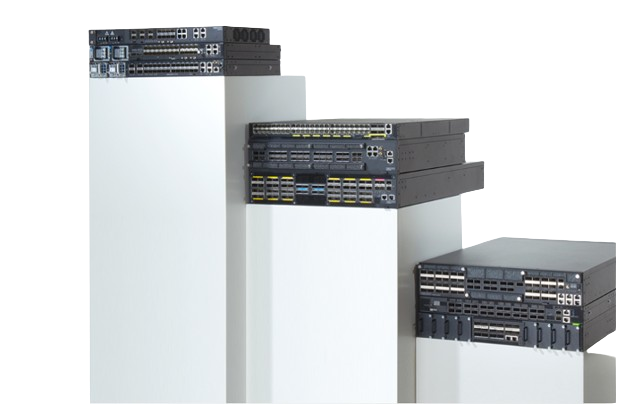
Port compatibility is only part of the design. A fully utilized duplex 10G link can produce up to 20 Gbps of monitor traffic. A single 10G tool port cannot accept all of it at once.
- Filter for the tool’s job. Deliver the traffic each security, performance or capture tool actually needs.
- Reduce avoidable volume. Deduplicate repeated packets and slice payloads where the analysis allows it.
- Share the load. Distribute traffic across tool groups while keeping each session together.
Size the tool side by expected traffic volume and processing capacity. Confirm which functions are available on the selected PacketMaestro platform and software package.
Plan the insertion. Keep the access.
Installing an inline optical TAP requires a planned interruption to the fiber link. Once installed, it provides a passive, unpowered access point. Changes to downstream monitoring tools can usually happen without touching the production connection.
SPAN remains useful for troubleshooting or when a maintenance window is unavailable. Its copies depend on the switch configuration and mirroring capacity, so assess congestion and packet-loss limits before relying on it for continuous capture.
Your breakout questions, answered
How many 10G links can one 40G packet-broker port monitor?
Two. Each duplex link produces two simplex monitor feeds, and a 4×10G breakout port accepts four. The density gain is in port count: an eight-link TAP uses four QSFP ports instead of sixteen SFP+ ports.
Can a 40G packet broker monitor 10G traffic?
Yes. A compatible 40GBASE-SR4, PLR4 or PSM4 interface in 4×10G breakout mode provides four independent 10G interfaces for TAP feeds. Confirm breakout and receive-only support on the exact optic and packet-broker port.
Does breakout work with LR4 or CWDM4 optics?
No. LR4, CWDM4 and FR4 combine wavelengths onto a fiber pair, so a passive harness cannot separate them into 10G or 25G lanes. This design needs compatible parallel optics such as SR4, PSM4 or PLR4. DR4 is also parallel, but 400G DR4 breaks out to 100G lanes and is outside these 10G/25G configurations.
Can I monitor both MMF and SMF links?
Yes. The MMF example uses the EN-TPSTCK8L25G-M73 with the EN-4LCTX-MTP4RX-03OM4 harness; SMF uses the EN-TPSTCK8L400G-S73 with the EN-4LCTX-MTP4RX-03SM harness. These TAP models have 70/30 splits. Select the M55 multimode variant when the link budget requires 50/50.
What split ratio should I use?
50/50 is a common starting point on multimode 10G/25G SR, where the power budget is tight. 70/30 is typical on singlemode. The correct value depends on both the production and monitoring link budgets. ECIN will calculate it from your transceivers, distances and connection losses.
Can a 40G/100G packet broker connect to 10G or 25G monitoring tools?
Yes, using compatible breakout on tool-facing ports. Size the tool side by expected throughput: a fully utilized duplex 10G link can produce up to 20 Gbps, so filtering, deduplication, slicing or load balancing may be required.
Get a port map for your network.
Send ECIN your link count, fiber type, transceiver models and distances. We will recommend the TAP split, harnesses, optics and PacketMaestro port configuration.
Contact Our Team