Open Visibility: a practical deployment reference for building a full visibility stack from physical traffic access all the way to advanced, DPU-accelerated processing. This architecture works in data centers, enterprise cores, and mobile carrier environments — anywhere you need high-speed monitoring with scale and flexibility.
Architecture
Layer 1: TAPstack — Traffic Acquisition
TAPstack provides the physical access points for all links you want to monitor.
Where it fits:
- Inline or OOB optical/multimode/singlemode up to 400G
- High-density 1U blocks (up to 24 TAPs)
- Copper TAPs for 1G/10G server and appliance links
Why it matters:
- 100% passive, fault-tolerant
- Produces an exact copy of traffic without any risk to production
- Available split ratios tune your optical budgets
This is your "clean data source." Every downstream tool depends on the fidelity of the traffic copy TAPstack provides.
Layer 2: PacketMaestro — L2 Visibility Fabric
PacketMaestro takes all TAP outputs and organizes traffic delivery to the right tools.
Core functions:
- Aggregation, replication, filtering, load balancing
- L2-L4 filtering for IPv4/IPv6
- VLAN tagging/untagging
- Port breakout (e.g., 400G→4x100G, 100G→4x25G)
- Multi-Tbps switching throughput
Common hardware choices:
This is your "traffic distribution layer." It simplifies large TAP environments, consolidates visibility across racks, and reduces tool sprawl by sending only relevant traffic.
Layer 3: PacketMaestro PRO — Advanced Processing
PacketMaestro PRO adds intelligent, DPU-powered processing when you need deeper analytics.
What it does:
- Deduplication
- Packet trimming / slicing
- DPI (Deep Packet Inspection)
- Data masking
- Tunnel termination and filtering: GTP, VXLAN, GRE
- Inner-IP load balancing
- LTE/5G session correlation (IMSI, UE, TEID)
- sFlow/NetFlow generation
Hardware options:
This is your "intelligence and traffic conditioning layer." These appliances plug into your visibility fabric like any other tool target and are ideal when downstream tools cannot handle raw high-rate traffic.
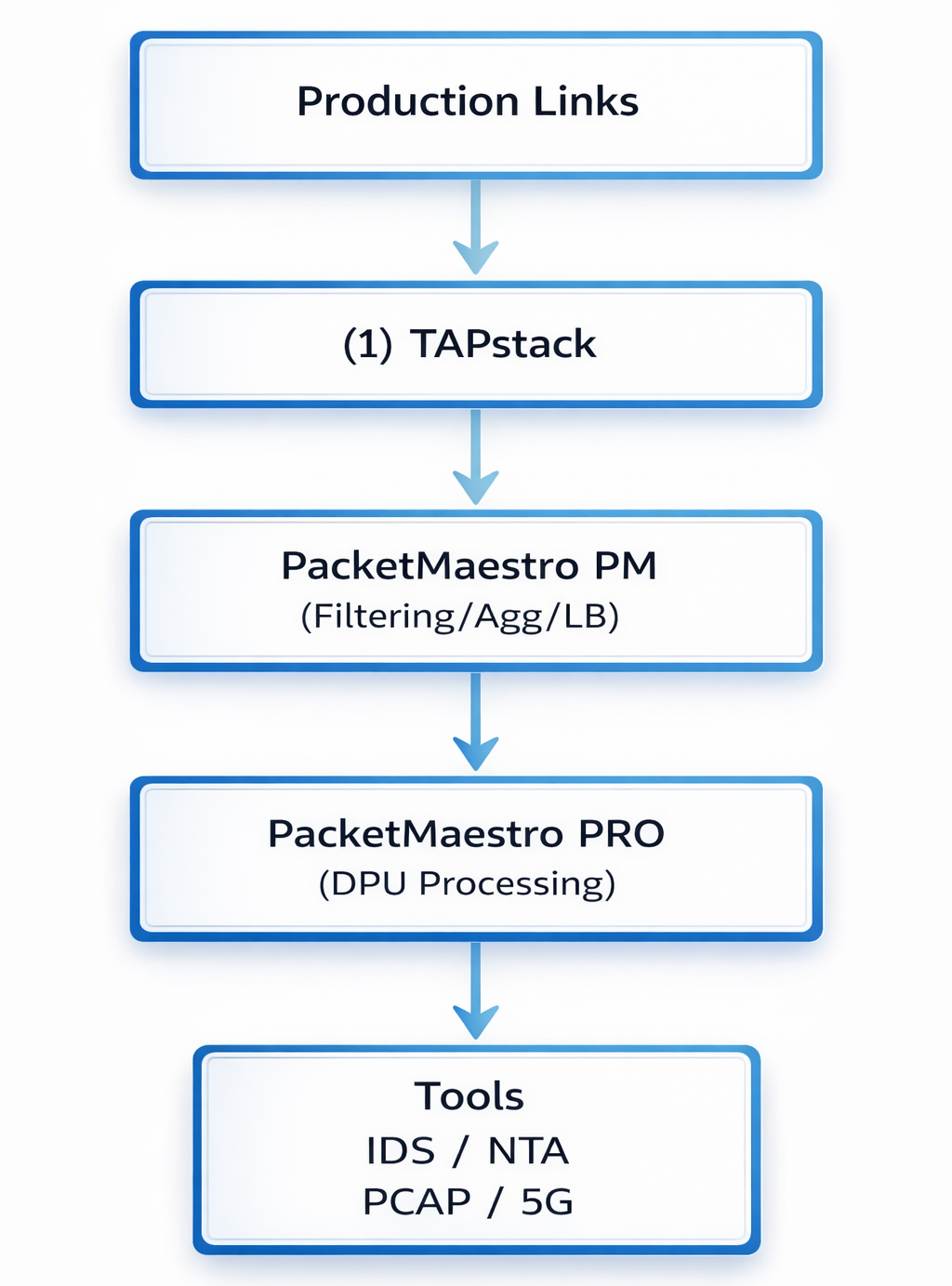
End-to-End Data Path
Step-by-step traffic path through the entire visibility stack:
- Production link → TAPstack — TAPstack creates a lossless copy of both directions.
- TAPstack → PacketMaestro ingress — All TAP outputs feed into PM at 10G/25G/100G/400G depending on the network.
- PacketMaestro → Filtering/Aggregation — PM groups, filters, and distributes traffic by service type, VLAN, app, or tool function.
- PacketMaestro → PacketMaestro PRO (optional) — When deeper inspection or cleanup is needed (e.g., for mobile cores or forensic tools), PM forwards traffic to ADP nodes.
- PacketMaestro PRO → Tool Farms — PM PRO cleans, correlates, trims, masks, or decapsulates traffic and sends optimized traffic to IDS/IPS, NDR/NTA, PCAP appliances, compliance/forensics, and UE analytics/5G probes.
Typical Deployment Scenarios
Data Center / Enterprise Core
- TAPstack on top-of-rack or core uplinks
- PacketMaestro PM400 as visibility spine
- PacketMaestro PM25/PM100 as leafs
- PM PRO for deduplication, masking, flow export
- Tools: NDR, APM, Forensics, PCAP
Mobile Carrier (4G/5G EPC / 5GC)
- TAPstack on S1-U, N3, N6, N9, and interconnect links
- PM100/PM400 for aggregation
- ADP200/220 for GTP decap, 5G signaling correlation, data masking, DPI
- Tools: probe farms, analytics, lawful intercept, user-plane monitoring
Inline Security / Zero Trust Visibility
- TAPstack inline copper with bypass options
- PM25/PM100 distributing decrypted or segmented traffic
- PM PRO for packet modification or DPI
- Tools: IDS, IPS, DLP, Proxy, Decryption gateways
Management and Automation
MaestroVision ties the whole stack together:
MaestroVision
- Auto-discovery of PM + PM PRO appliances
- Centralized drag-and-drop map/rule creation
- Topology-aware visibility view
- Real-time stats and telemetry
- Advanced search across devices
This makes large, multi-rack or multi-site visibility deployments straightforward to operate.
High-Level Reference Diagram
Deployment Tips
When to use PM PRO
- Duplicates are >20% of traffic
- Heavy tunneling: GTP, VXLAN, GRE
- Tools cannot ingest raw 100G/400G
- Need masking or privacy controls
- Need session-steered traffic for probes
When PM alone is enough
- Basic aggregation and filtering
- Low-volume packet brokering
- Simple multicast/replication
Where to place TAPstack: At any link where visibility matters — core, edge, DC spine, 5G UPF, SGW, routers, firewalls.
TAPstack and PacketMaestro questions, answered
What is the role of TAPstack?
TAPstack provides traffic access at the network link so monitoring can remain independent of the production switching configuration.
What does PacketMaestro do with that traffic?
PacketMaestro aggregates, filters, replicates and steers the collected packets toward monitoring, performance and security tools.
Can the two platforms be deployed separately?
Yes. The right combination depends on existing access points, tool requirements and whether traffic needs aggregation or conditioning before delivery.
What should be sized first?
Measure link speeds, traffic volume, burst behaviour, tool capacity, required copies and expected growth across the complete data path.
Ready to Build Your Visibility Architecture?
Let us help you design the right TAPstack + PacketMaestro deployment for your environment.